Synchronous vs Asynchronous Programming: A Complete Guide
The Future of Sync and Async: Trends to Watch

Curious about how Sync and Async programming can enhance your coding skills and application performance? Dive into this article to learn the fundamental differences, use cases, and best practices for mastering both approaches in your development projects. Don’t forget to subscribe for more in-depth tutorials and tips!
Modern apps have to be responsive and accomplish several tasks quickly. Two basic programming paradigms handle this problem: synchronous and asynchronous programming. With useful examples and graphic depictions to show their distinctions, benefits, and optimal use cases, this book investigates both synchronous and asynchronous programming in full.

Synchronous Programming Core Concepts and Definition
Synchronous programming runs on a sequential execution model whereby every operation has to finish before the next one starts. This blocking behavior produces a simple, predictable execution flow that is easy to understand.
Main Features
Key Features
Sequential Execution: Operations run one after another
Blocking Nature: Each operation blocks future operations until completion
Predictable Flow: Program execution follows a linear path
Simplified Debugging: Easier to track program flow and detect faults
Examples of Synchronous Programming
# Synchronous file reading in Python
def read_file(filename):
    print(f"Opening {filename}")
    with open(filename, 'r') as file:
        content = file.read()  # This blocks until file is read completely
    print(f"Finished reading {filename}")
    return content

# Main execution
print("Starting program")
data = read_file("large_file.txt")  # Blocks here until read_file completes
processed_data = process_data(data)  # Won't start until read_file finishes
print("Program completed")
// Synchronous HTTP request in Java
public String fetchDataSync(String url) throws IOException {
System.out.println("Fetching data from: " + url);
URL apiUrl = new URL(url);
HttpURLConnection connection = (HttpURLConnection) apiUrl.openConnection();
connection.setRequestMethod("GET");
BufferedReader reader = new BufferedReader(
new InputStreamReader(connection.getInputStream()));
String line;
StringBuilder response = new StringBuilder();
while ((line = reader.readLine()) != null) {
response.append(line);
}
reader.close();
System.out.println("Completed fetching data");
return response.toString();
}
// Usage
String result = fetchDataSync("https://api.example.com/data"); // Blocks here
System.out.println("Processing result..."); // Won't execute until fetch completesAsynchronous Programming Core Concepts and Definition
Asynchronous programming lets several operations run concurrently without interfering with the primary execution thread. An asynchronous operation starts the program running in the background; it then runs while the program runs other code.
Main Features
Operations can run concurrently under non-blocking execution. Long-running tasks keep the program interactive, thereby improving responsiveness.
Event-driven Execution usually follows event handlers or callbacks in Flow.
Greater complexity calls for meticulous operation state and completion control.
Frequent Asynchronous Patterns
Callbacks: Functions are given as parameters to run upon an operation’s conclusion.
// JavaScript callback example
function fetchData(url, callback) {
  console.log("Starting fetch from: " + url);
  // Simulate network request
  setTimeout(() => {
    const data = { result: "Success", timestamp: Date.now() };
    callback(data);
  }, 2000);
  console.log("Fetch initiated, continuing with other tasks");
}

console.log("Program start");
fetchData("https://api.example.com/data", (result) => {
  console.log("Data received:", result);
});
console.log("Doing other work while fetch is in progress");
2. Promises: Objects signify the ultimate completion (or failure) of an asynchronous activity.
// JavaScript Promise example
function fetchData(url) {
  console.log("Starting fetch from: " + url);
  return new Promise((resolve, reject) => {
    // Simulate network request
    setTimeout(() => {
      const success = true;
      if (success) {
        const data = { result: "Success", timestamp: Date.now() };
        resolve(data);
      } else {
        reject(new Error("Failed to fetch data"));
      }
    }, 2000);
  });
}

console.log("Program start");
fetchData("https://api.example.com/data")
  .then(result => {
    console.log("Data received:", result);
    return processData(result);
  })
  .then(processedResult => {
    console.log("Processing complete:", processedResult);
  })
  .catch(error => {
    console.error("Error:", error);
  });
console.log("Doing other work while fetch is in progress");
3. Asynchronous/Await: Syntactic sugar enhances readability by making asynchronous code look like synchronous code.
// JavaScript async/await example
async function fetchAndProcess() {
  try {
    console.log("Starting fetch process");
    const data = await fetchData("https://api.example.com/data");
    console.log("Data received:", data);

    const processedData = await processData(data);
    console.log("Processing complete:", processedData);

    return processedData;
  } catch (error) {
    console.error("Error in fetch and process:", error);
  }
}

// Using the async function
console.log("Program start");
fetchAndProcess().then(result => {
  console.log("All operations completed with result:", result);
});
console.log("Continuing with program execution");
4. Asynchronous Programming Based on Events
# Python with asyncio
import asyncio

async def fetch_data(url):
    print(f"Fetching data from {url}")
    # Simulate network delay
    await asyncio.sleep(2)
    print(f"Completed fetching from {url}")
    return f"Data from {url}"

async def process_data(data):
    print(f"Processing {data}")
    await asyncio.sleep(1)
    return f"Processed {data}"

async def main():
    # Run tasks concurrently
    task1 = asyncio.create_task(fetch_data("api.example.com/users"))
    task2 = asyncio.create_task(fetch_data("api.example.com/products"))

    print("Tasks initiated, continuing with other operations")

    # Await both tasks
    result1 = await task1
    result2 = await task2

    # Process results
    processed1 = await process_data(result1)
    processed2 = await process_data(result2)

    print(f"All operations completed: {processed1}, {processed2}")

# Run the async program
asyncio.run(main())
Visual Comparison
Synchronous vs Asynchronous Execution Flow
Synchronous execution follows a linear path, with each operation blocking until completion:
Operation 1 ────────► Operation 2 ────────► Operation 3 ────────► EndAsynchronous execution allows operations to run concurrently:
Operation 1 ──────────────────────────────────────────►
      │                                                │
      ▼                                                ▼
Operation 2 ───────────────────────►              Results
      │                             │            Combined
      ▼                             ▼                │
Operation 3 ─────────────────────────────────────────▼
                                                     End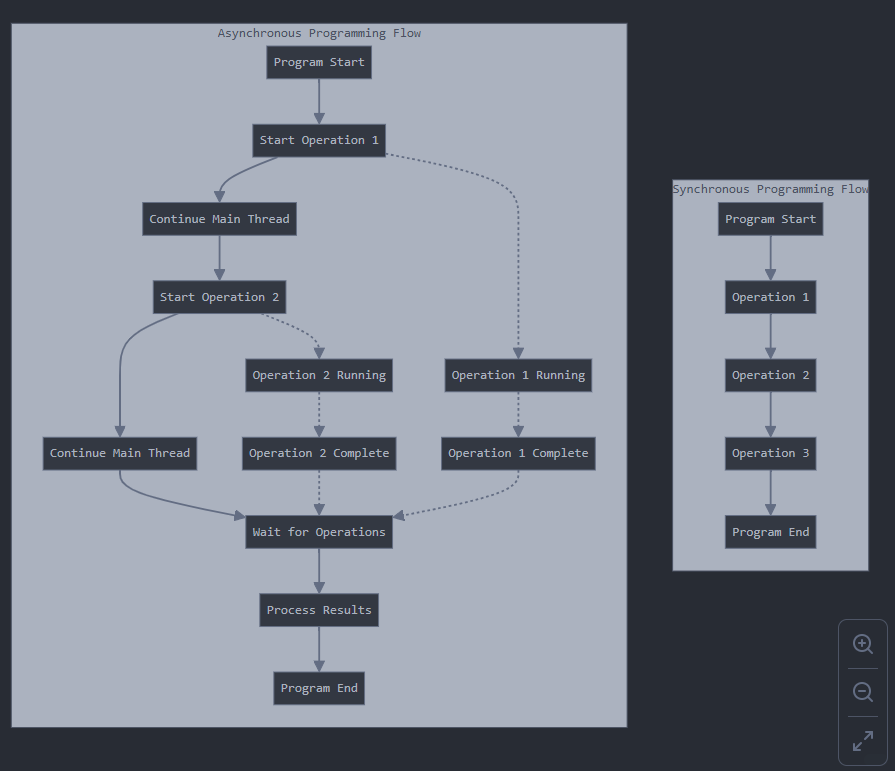
When to Use Each Approach
Use Synchronous Programming When:
Operation Simplicity: Tasks are quick and computationally simple
Sequential Dependency: Each operation depends on the result of the previous one
Program Clarity: Code readability and maintenance are prioritized over performance
Limited Concurrency Needs: Application doesn’t need to handle multiple operations simultaneously
Resource Constraints: System has limited memory or processing capabilities
Use Asynchronous Programming When:
I/O-Bound Operations: Handling file operations, network requests, database queries
User Interface Responsiveness: Creating interactive applications that must remain responsive
High Concurrency: Serving multiple clients or processing many operations simultaneously
Resource Efficiency: Maximizing CPU utilization during waiting periods
Scalability Requirements: Building systems that need to handle growing workloads
Conclusion
Both synchronous and asynchronous programming paradigms have their place in modern software development. Synchronous code excels in simplicity and predictability, while asynchronous code enables responsiveness and scalability. Choosing between them requires understanding your application’s specific requirements, the nature of the operations being performed, and the expected user experience.
As systems grow more distributed and user expectations for responsiveness increase, mastering asynchronous programming techniques becomes increasingly important. However, the best solutions often combine both approaches, using synchronous code where simplicity matters and asynchronous code where performance and responsiveness are critical.
Ready to implement Sync and Async programming in your next project? Start applying the insights from this article to optimize performance and scalability in your applications. Have questions or need further clarification? Drop a comment below, and let’s discuss! And don’t forget to subscribe for more expert content and updates!